CV Payment Reminder Automation
Scheduled client payment reminder automation pipeline integrating n8n, Google Sheets, and Telegram Bot API in a containerized Docker environment.
My Role
Workflow Automation Developer
Category
Workflow Automation
Timeline / Date
2026
Runtime Environment
Docker (Local Container)
01 / The Problem
Manual Payment Tracking & Follow-up Friction
Managing client billing cycles and sending timely payment reminders manually is time-consuming, prone to human error, and inconsistent. Without an automated scheduler, freelancers and service agencies frequently experience delayed cash flows, missed follow-ups, and repetitive copy-pasting of payment notices across chat applications.
02 / The Solution
Scheduled n8n Orchestrator & API Integration
Architected and deployed a containerized n8n automation workflow that polls client payment ledgers in Google Sheets, evaluates payment status using conditional IF logic, dispatches personalized Telegram notifications via Telegram Bot API, and updates spreadsheet records with confirmation timestamps to prevent duplicate reminders.
03 / Workflow Architecture & Evidence
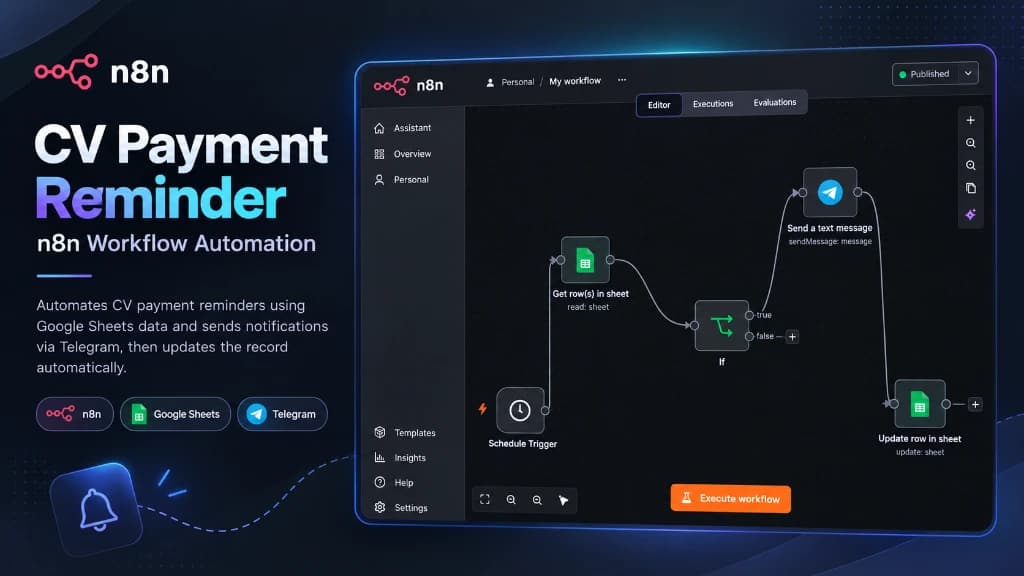
Actual n8n Workflow Architecture & Editor Canvas
Genuine visual workflow canvas captured directly from the local n8n editor interface running in Docker. Demonstrates the complete 5-node pipeline with execution connectors, schedule triggers, conditional decision branching, and bidirectional spreadsheet sync. Click the canvas to enlarge.
04 / Pipeline Execution
Five Sequential Workflow Steps
Step-by-step data lifecycle: from scheduled automated trigger execution through spreadsheet row reading, conditional evaluation, instant Telegram dispatch, and final row update.
Schedule Trigger
Fires automatically on a configured cron schedule (e.g., daily at 09:00 AM) to initiate the billing audit cycle without manual effort.
Google Sheets
Connects via Google Cloud OAuth2 to read client payment ledgers, fetching client names, amounts, due dates, and Telegram Chat IDs.
IF Condition
Evaluates business logic: checks if status is "Pending" and due date is reached. Only "true" records route to notification; "false" branches terminate.
Telegram Bot
Calls Telegram Bot API to dispatch a formatted Markdown reminder alert with client name, invoice number, due balance, and payment instructions.
Update Row
Writes confirmation back to Google Sheets, setting status to "Sent" with an ISO timestamp. Guarantees idempotency and prevents duplicate alerts.
05 / Notification Evidence
Telegram Notification Evidence & Payload Structure
Automated message output generated by the Telegram node and dispatched directly to client chat recipients via the Telegram Bot API.
@cv_payment_reminder_bot · automated
Dear client, this is a scheduled payment reminder regarding your pending invoice for professional CV/Resume services.
Please remit payment at your earliest convenience or reply if payment has already been sent. Thank you!
API Specification
Telegram Bot API Integration
The n8n Telegram node communicates directly with the official Telegram Bot API endpoint using secure encrypted credentials.
POST https://api.telegram.org/bot<TOKEN>/sendMessage
- • chat_id: "847291038"
- • parse_mode: "Markdown"
- • disable_web_page_preview: true
HTTP 200 OK · ok: true, message_id: 10482
Confidentiality: Real API tokens and sensitive customer identities are safely masked in accordance with production security standards.
06 / Key Features
Core System Capabilities & Workflows
Automated Schedule Trigger initiating periodic payment audit cycles.
Feature 01
Google Sheets node securely querying pending client invoice records via Google Cloud API.
Feature 02
Conditional IF routing logic filtering overdue and unnotified clients.
Feature 03
Telegram Bot API integration dispatching formatted payment reminder messages.
Feature 04
Automated spreadsheet row updates writing confirmation timestamps to ensure idempotency.
Feature 05
Containerized Docker architecture ensuring lightweight, reproducible local execution.
Feature 06
07 / Engineering Contribution
My Specific Role & Responsibilities
Workflow Automation Developer responsible for end-to-end pipeline architecture, n8n Docker container setup, Google Cloud OAuth2 credentials configuration, Telegram Bot API token setup, conditional routing logic, and spreadsheet row status tracking.
08 / Technology Architecture
Full-Stack Technology Decisions
Backend & APIs
- n8n Workflow Automation
- Docker Container
- Node.js Runtime
- Cron Scheduler
Frontend & UI
- n8n Visual Workflow Canvas
- Google Sheets Spreadsheet UI
- Telegram Mobile & Desktop Apps
Database Layer
- Google Sheets API v4
- Tabular Client Ledger Schema
- Row Status Tracking
Integrations & Tools
- Telegram Bot API
- Google Cloud Platform (GCP)
- OAuth2 Service Connection
- HTTP Request / Webhooks
09 / Data Layer
Google Sheets Ledger Schema & Data Layer
Utilizes Google Sheets as a structured, lightweight tabular database accessible via Google Sheets API v4. Each row represents an individual client transaction with strict column definitions.
Tabular Ledger Columns
- Client ID & Name: Unique client identifier and customer contact name
- Due Amount & Currency: Pending balance and service fee
- Payment Due Date: Scheduled date threshold used by conditional IF logic
- Telegram Chat ID: Recipient destination ID for targeted bot delivery
- Reminder Status & Timestamp: Status flag and dispatch timestamp preventing duplicate alerts
Data Integrity Principles
- Tabular normalization ensuring distinct rows for each billing transaction
- Explicit status column ("Pending", "Sent", "Paid") ensuring idempotency
- Audit timestamp logging recording exactly when the reminder was dispatched
10 / Orchestration Flow
n8n Node Orchestration & API Data Flow
Orchestrates RESTful API requests between Google Cloud Sheets API v4 and Telegram Bot API using n8n pre-built credential handlers and secure environment variables in Docker.
11 / Problem Solving
Engineering Challenges & Technical Solutions
Challenge 01
Preventing duplicate reminder notifications on consecutive automated schedule runs.
Engineered Solution:
Engineered a state-tracking update step: after Telegram successfully dispatches the message, the workflow immediately writes back to the Google Sheet row, updating the status to "Sent" and logging the timestamp so subsequent runs skip already-notified clients.
Challenge 02
Handling rate limits and connection retries when contacting Telegram Bot API.
Engineered Solution:
Configured built-in n8n retry-on-failure settings and error output paths to capture transient network blips without crashing the container.
Challenge 03
Managing secure credentials in a self-hosted Dockerized environment.
Engineered Solution:
Created an isolated Docker environment with persistent volume storage for n8n configuration, storing sensitive tokens and API keys securely in n8n encrypted credentials storage.
12 / Results & Takeaways
Implementation Summary & Learning Outcomes
Successfully engineered and tested a production-ready automated payment reminder pipeline using n8n, Google Sheets, and Telegram Bot API. The workflow eliminates manual tracking, guarantees timely client communication, and demonstrates practical API integration and workflow automation capabilities.
- 100% automated scheduled payment verification
- Zero manual copy-pasting for payment notices
- Containerized Docker deployment with persistent state
- Idempotent row updates preventing duplicate notifications
- Reliable Google Cloud and Telegram Bot API integration